
What is Deceptive Content & How To Fix your Suspended GMB Profile?
Out of 10 Google My Business Profile Suspension cases almost 8 Business profiles are suspended due to Deceptive Content Policy. Today we will try to decode the Deceptive content policy in Google My Business Profile Suspension.
When you check your Business Profile Suspension page then Google Gives you the reason why Your Business profile is suspended and when you try to check the help article for deceptive content you do not get the straight answers. Google has its own reasons not to give you the exact reasons or a flag that triggered Your Google my Business Suspension.
What is Deceptive Content Policy?
You must be wondering why your Google Business Profile was suspended due to deceptive content policy? You are not alone. Every singh;e business owner does not know what went wrong or what they did wrong that triggered the GMB Suspension for deceptive content policy.
Deceptive content policy means when your business profile information especially NAP (Name, Address, Phone Number) is not consistent with your online presence like your website, social media, Yelp, Better Business Bureau etc then it’s a direct threat to your Google Business Profile.
Let's deep down into this and find out the solution for deceptive content policy.
Business Name: If your Business name in your Google Business profile is having keyword stuffing eg: “London Garage Door Best Garage Door Near You” Or “Dominos Pizza NYC Best Pizza Shop” then it is a direct policy violation and considered as deceptive Content Policy. Instead of doing excessive keyword stuffing you can use “London Garage Door” where the Garage Door is already a keyword.
Note: Your Business Profile name should be exactly the same as what you have in your Business Official Documents. Make sure Your Business documents such as Business Registration, Business License, Certificate Of Insurance have the same Business Name. Because using the same Business name will save your time and it will avoid risk of any future suspension.
How to Select Business Name in Google Business Profile?
Do not use any extra keywords in your business profile name until you have a business name eg: Brooklyn Beauty Salon where Beauty salon is a keyword but make sure this name is available in your business documents.
Check the Google’s Official Guideline:
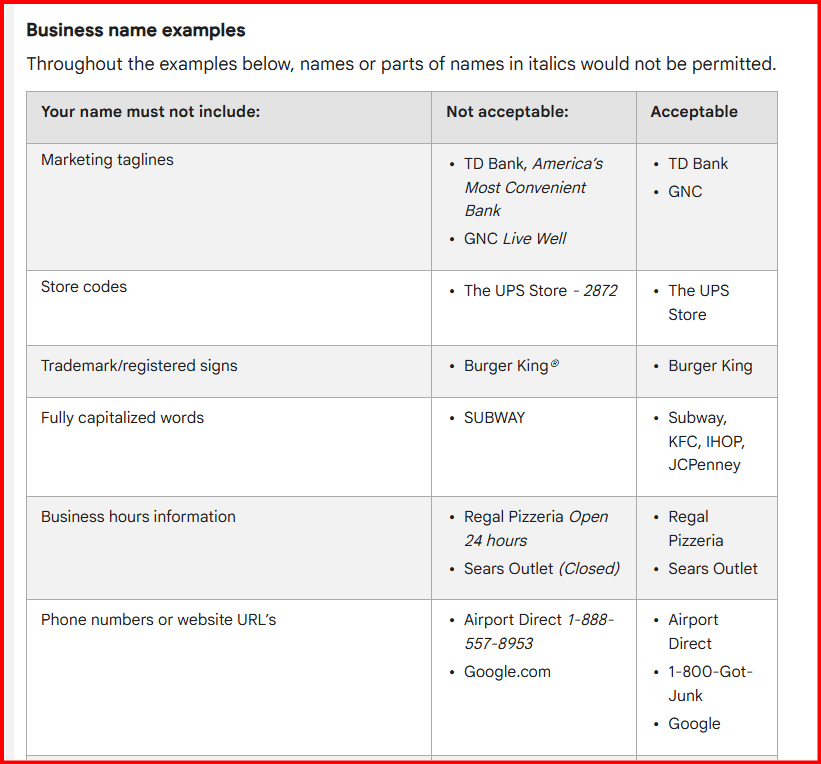
If you are trying to create a Google Business Profile for the first time or setting up a new business entity LLC or Inc then do search on maps.google.com with your business vertical to make sure you are not copying anyone else's business name. Because Google prefers an unique business name to avoid any future confusion or conflict with the duplicate business name.
Phone Number: Not a lot of Google Business product experts talk about this but phone number plays an important role to your GBP (Google Business Profile). Make sure your main business phone number is a local phone number not from any other city or state or country.
Yes, You heard it right. Google My Business profile is more like a local business platform that helps people who are looking for any services near by their area. Example: If your business profile is listed in Los Angeles but the phone number you have is from Las Vegas then there is a problem and it might be triggered as deceptive content or policy violation. Google has this Google My Business profile Guidelines where they have clearly mentioned about the Phone Number guideline. Hence, your phone number and area code for Los Angeles should be any of these (213, 323, 310, 424, 818, and 747).
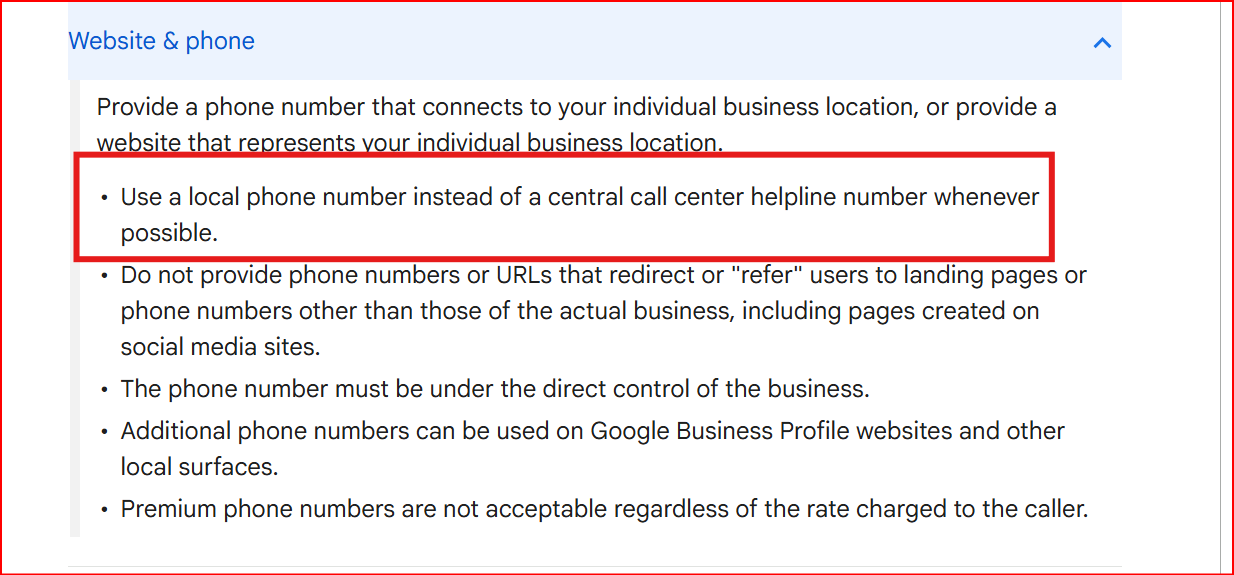
Moreover, You have to make sure that your same business phone number is mentioned on your website, social media etc.
Note: If you have changed your business location and are using the same old phone number to your new GMB Profile then you should change that ASAP.
Address: This is another important part of your business that people often make mistakes and it causes the GMB Suspension. We Zonic Media have helped reinstating more than 300+ Businesses and doing so we have found that Small Business owners had selected their business location in an inappropriate way.
Physical Address: Make Sure the physical location address in your Google Business profile is not a home address. But if you are using a home address to your business profile then make sure it is hidden and not visible publicly.
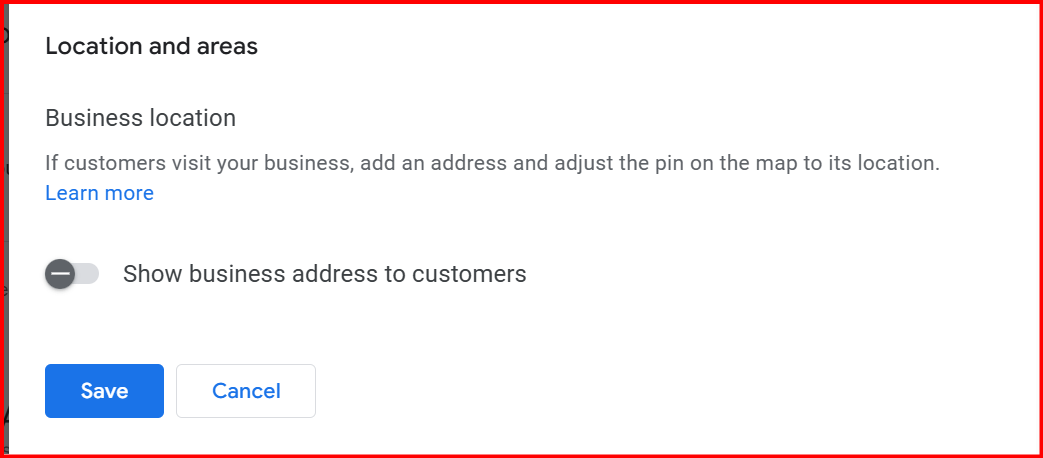
Because as per Google's guideline for the Address Business owners are not allowed to show their home address in your business profile. Instead you can still use the home address but hiding it and work as a Service Area Business.
Physical address is a commercial office or a place where people can meet you or your staff are operating from the location then only you can show this on your Business profile.
And once again, make sure if you are a service area based business and serve at multiple locations then mention all the service areas you cover on your website. Footer is the best place to mention all of your service areas.
Tip: You can mention “Area We Serve: and Add all of the service areas you cover. But make sure the service areas you cover are not more than farther than 2 hours of travel from your main location.
If you have the physical address then make sure you display the same address on your website or on social media pages.
A Business who works on hybrid models ( who is using both physical addresses and also serves at customers locations using the service area) should show both on their website.
Note: Make sure while creating the Google Business profile and get verified you have not used any PO Box address, Virtual Office Address or any Co-working space, because Google does not allow that and it is against their Guidelines. For more detailed discussion you may contact us or schedule a free Google My Business Audit.
Website: Before 2024 Google used to create one landing page website for each business profile was created but this option is no more for small businesses and since then it has become a challenge for small businesses owners to build a website for their business.
Your website plays an important role to your Google Business profile when it comes to verifying your Business information especially Name, Address and the phone number. In other words your website is a replica of your Google Business profile.
It means all of your business information you have added to your business profile should be present and consistent throughout your website. Because this is the main source from where Google AI checks and verifies your details you have added to your business profile.
There are some other aspects of your website that need to be considered.
Make Sure Your website is secured and it has SSL certificate enabled.
Make Sure there is no redirection to any third party websites.
Make Sure your website is indexed on Google Search Console.
Make Sure the content on your website is original, not copied or replica of any other site.
Make Sure the speed is good and it’s a user friendly website
Working Hours: Make sure you have selected the right business hours and not pretending to be 24 hours available. Because Google is so smart eg: If you are a HVAC contractor and selected your business working 24 hours but when someone calls you or try to visit your office and finds no one answered the call or shop or office is closed then it’s a risk. Your customer can fill the complaint form and report your profile. If not a customer but definitely your competitor or their Local SEO Agency if they find out you are misleading.
Some Other Useful Google My Business Guideline to Consider
Business category: Google gives you an option to add one primary category and 6 additional categories for your Google My Business Profile. Make sure you select the right business category to your business profile. Because if you try to add a wrong business category that has nothing to do with your business and niche then do not add it to your GBP profile.
Business Description: This is one of the most important main parts of your business profile. Make sure your business profile description precisely describes your business.
Tip: Three points to write and include in your business profile. 1. What you Do 2. How You Do. 3. Where do you serve your customers
Conclusion:
Being a business owner you might not manage your business profile as a professional local SEO expert. Although, you have to make sure you set up the GBP profile by following the guidelines. In case you need more help and a free profile audit. You can schedule a meeting with one of the GMB and Local SEO experts at Zonic Media and we will help you to set up the profile or if your Google my business profile is suspended we can help to reinstate the same.
